状态图
- 2021 年 12 月 27 日
- 需求建模
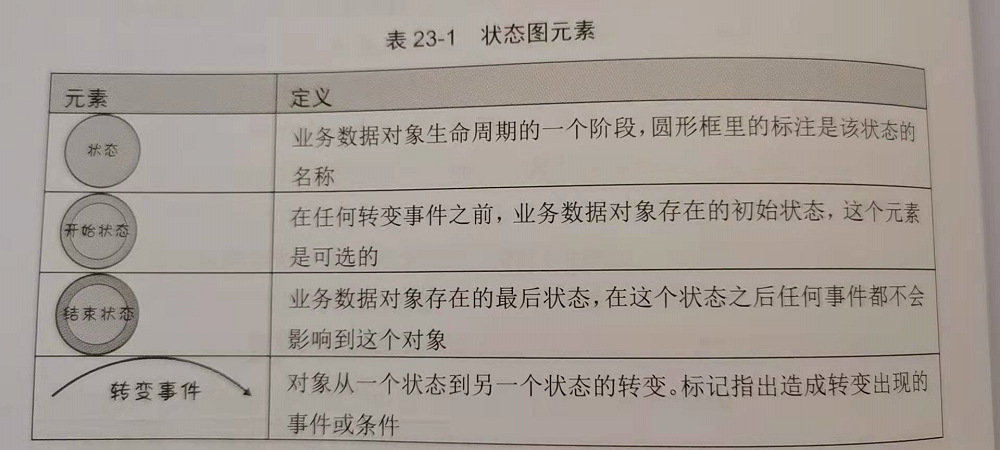
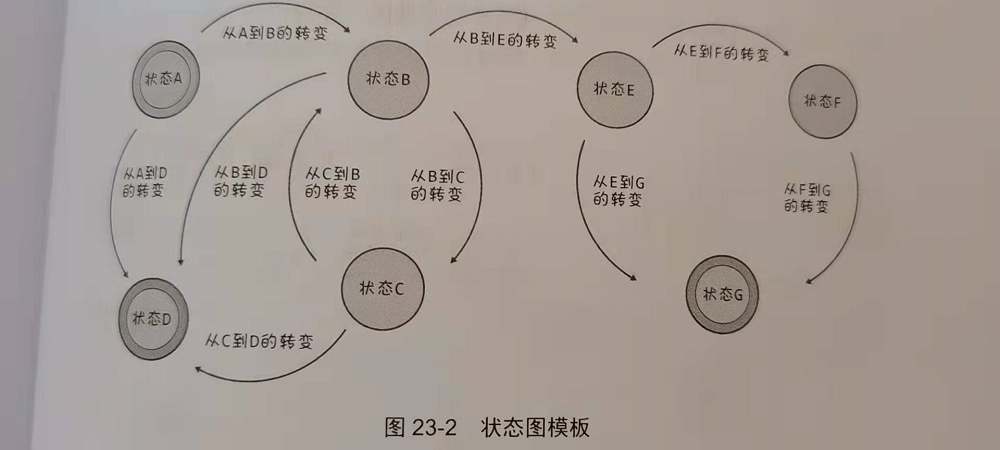
状态图模版
如果系统包含复杂的状态关系,需要先输出状态表,否则可能会导致确实状态。
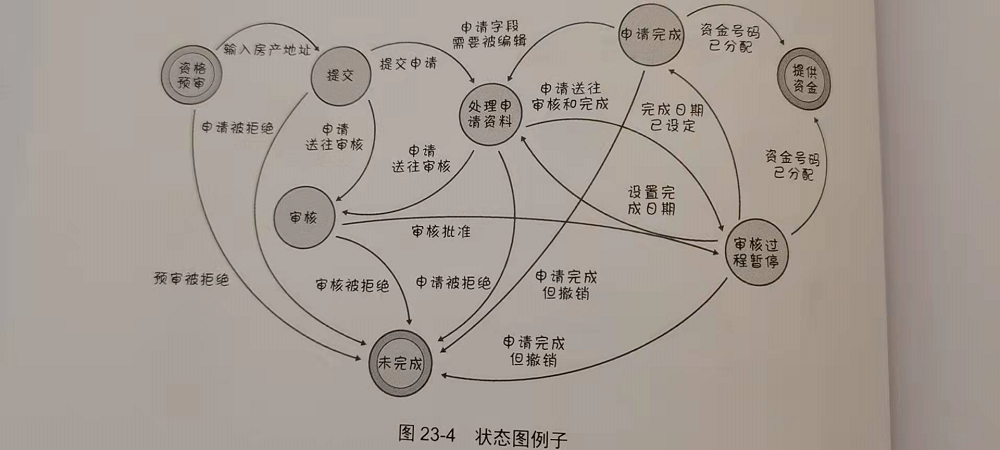
例子
参考文献
- 《软件需求与可视化模型》第五部分 — Joy Beatty && Anthony Chen
CustomResource
- 2021 年 12 月 26 日
- kubernetes
设置结构化模式(Schema)
CustomResource 对象在定制字段中保存结构化的数据,这些字段和内置的字段 apiVersion、kind 和 metadata等
一起存储,不过内置的字段都会被 API 服务器隐式完成合法性检查。
可以设置一个模式Schema,在创建和更新定制对象时,这一模式会被用来对对象内容进行合法性检查。
结构化模式本身是一个 OpenAPI v3.0 验证模式,其中:
- 为对象根(root)设置一个非空的 type 值(藉由 OpenAPI 中的 type),对每个 object 节点的每个字段(藉由 OpenAPI 中的 properties 或 additionalProperties)以及 array 节点的每个条目(藉由 OpenAPI 中的 items)也要设置非空的 type 值, 除非: 节点包含属性 x-kubernetes-int-or-string: true 节点包含属性 x-kubernetes-preserve-unknown-fields: true
- 对于 object 的每个字段或 array 中的每个条目,如果其定义中包含 allOf、anyOf、oneOf 或 not,则模式也要指定这些逻辑组合之外的字段或条目(试比较例 1 和例 2)。
- 在 allOf、anyOf、oneOf 或 not 上下文内不设置 description、type、default、 additionalProperties 或者 nullable。此规则的例外是 x-kubernetes-int-or-string 的两种模式(见下文)。
- 如果 metadata 被设置,则只允许对 metadata.name 和 metadata.generateName 设置约束。
参考资料
kubebuilder
- 2021 年 12 月 25 日
- kubernetes
安装
我安装的系统是:
root@sun:/home/julien/operator/sample# cat /etc/lsb-release
DISTRIB_ID=Ubuntu
DISTRIB_RELEASE=16.04
DISTRIB_CODENAME=xenial
DISTRIB_DESCRIPTION="Ubuntu 16.04.6 LTS"
我使用官网安装的kubebuilder。
安装后可以查看相关命令行:
root@sun:/home/julien/operator/sample# kubebuilder version
Version: main.version{KubeBuilderVersion:"3.1.0", KubernetesVendor:"1.19.2", GitCommit:"92e0349ca7334a0a8e5e499da4fb077eb524e94a", BuildDate:"2021-05-27T17:54:28Z", GoOs:"linux", GoArch:"amd64"}
初始化创建
kubebuilder init
在kubebuilder init命令中,kubebuilder会创建下面几个基本的工程文件。
root@b5700554c4c1:/home/ready/go/src/guardians# kubebuilder init --help
Initialize a new project including vendor/ directory and Go package directories.

Writes the following files:
- a boilerplate license file
- a PROJECT file with the project configuration
- a Makefile to build the project
- a go.mod with project dependencies
- a Kustomization.yaml for customizating manifests
- a Patch file for customizing image for manager manifests
- a Patch file for enabling prometheus metrics
- a cmd/manager/main.go to run
创建工程
root@sun:/home/julien/gerrit/goworkspace/src# mkdir guardians
root@sun:/home/julien/gerrit/goworkspace/src# cd guardians/
root@sun:/home/julien/gerrit/goworkspace/src/guardians# kubebuilder init --domain my.domain --repo my.domain/guardians
Writing kustomize manifests for you to edit...
Writing scaffold for you to edit...
Get controller runtime:
$ go get sigs.k8s.io/controller-runtime@v0.8.3
Update dependencies:
$ go mod tidy
Next: define a resource with:
$ kubebuilder create api
创建 API
root@sun:/home/julien/gerrit/goworkspace/src/guardians# kubebuilder create api --group webapp --version v1 --kind Guardians
Create Resource [y/n]
y
Create Controller [y/n]
y
Writing kustomize manifests for you to edit...
Writing scaffold for you to edit...
api/v1/guardians_types.go
controllers/guardians_controller.go
Update dependencies:
$ go mod tidy
Running make:
$ make generate
go: creating new go.mod: module tmp
Downloading sigs.k8s.io/controller-tools/cmd/controller-gen@v0.4.1
go get: sigs.k8s.io/controller-tools/cmd/controller-gen@v0.4.1: Get "https://goproxy.io/sigs.k8s.io/controller-tools/cmd/controller-gen/@v/v0.4.1.info": x509: certificate signed by unknown authority
Makefile:90: recipe for target 'controller-gen' failed
make: *** [controller-gen] Error 1
Error: failed to create API: unable to run post-scaffold tasks of "base.go.kubebuilder.io/v3": exit status 2
Usage:
  kubebuilder create api [flags]

Examples:
  # Create a frigates API with Group: ship, Version: v1beta1 and Kind: Frigate
  kubebuilder create api --group ship --version v1beta1 --kind Frigate

  # Edit the API Scheme
  nano api/v1beta1/frigate_types.go

  # Edit the Controller
  nano controllers/frigate/frigate_controller.go

  # Edit the Controller Test
  nano controllers/frigate/frigate_controller_test.go

  # Install CRDs into the Kubernetes cluster using kubectl apply
  make install

  # Regenerate code and run against the Kubernetes cluster configured by ~/.kube/config
  make run


Flags:
      --controller           if set, generate the controller without prompting the user (default true)
      --crd-version string   version of CustomResourceDefinition to scaffold. Options: [v1, v1beta1] (default "v1")
      --force                attempt to create resource even if it already exists
      --group string         resource Group
  -h, --help                 help for api
      --kind string          resource Kind
      --make make generate   if true, run make generate after generating files (default true)
      --namespaced           resource is namespaced (default true)
      --plural string        resource irregular plural form
      --resource             if set, generate the resource without prompting the user (default true)
      --version string       resource Version

Global Flags:
      --plugins strings   plugin keys to be used for this subcommand execution

2021/12/25 11:10:05 failed to create API: unable to run post-scaffold tasks of "base.go.kubebuilder.io/v3": exit status 2
上面的:x509: certificate signed by unknown authority 查了一下,是客户端证书问题:
访问https时为何会出现x509 certificate signed by unknown authority
但是机器上/etc/ssl证书是在的,并且执行update-ca-certificates命令,更新证书数为0.经过各种尝试,未果。
最终找到公司的一个goproxy,完成命令执行。
root@sun:/home/julien/gerrit/goworkspace/src/guardians# kubebuilder create api --group webapp --version v1 --kind Guardians
Create Resource [y/n]
y
Create Controller [y/n]
y
Writing kustomize manifests for you to edit...
Writing scaffold for you to edit...
api/v1/guardians_types.go
controllers/guardians_controller.go
Update dependencies:
$ go mod tidy
Running make:
$ make generate
go: creating new go.mod: module tmp
Downloading sigs.k8s.io/controller-tools/cmd/controller-gen@v0.4.1
go get: added sigs.k8s.io/controller-tools v0.4.1
/home/julien/gerrit/goworkspace/src/guardians/bin/controller-gen object:headerFile="hack/boilerplate.go.txt" paths="./..."
此时创建出来的工程目录以及文件为:
root@10076736:/home/julien/gerrit/goworkspace/src/guardians# tree
.
├── api
│   └── v1
│       ├── groupversion_info.go
│       ├── guardians_types.go
│       └── zz_generated.deepcopy.go
├── bin
│   └── controller-gen
├── config
│   ├── crd
│   │   ├── kustomization.yaml
│   │   ├── kustomizeconfig.yaml
│   │   └── patches
│   │       ├── cainjection_in_guardians.yaml
│   │       └── webhook_in_guardians.yaml
│   ├── default
│   │   ├── kustomization.yaml
│   │   ├── manager_auth_proxy_patch.yaml
│   │   └── manager_config_patch.yaml
│   ├── manager
│   │   ├── controller_manager_config.yaml
│   │   ├── kustomization.yaml
│   │   └── manager.yaml
│   ├── prometheus
│   │   ├── kustomization.yaml
│   │   └── monitor.yaml
│   ├── rbac
│   │   ├── auth_proxy_client_clusterrole.yaml
│   │   ├── auth_proxy_role_binding.yaml
│   │   ├── auth_proxy_role.yaml
│   │   ├── auth_proxy_service.yaml
│   │   ├── guardians_editor_role.yaml
│   │   ├── guardians_viewer_role.yaml
│   │   ├── kustomization.yaml
│   │   ├── leader_election_role_binding.yaml
│   │   ├── leader_election_role.yaml
│   │   ├── role_binding.yaml
│   │   └── service_account.yaml
│   └── samples
│       └── webapp_v1_guardians.yaml
├── controllers
│   ├── guardians_controller.go
│   └── suite_test.go
├── Dockerfile
├── go.mod
├── go.sum
├── hack
│   └── boilerplate.go.txt
├── main.go
├── Makefile
└── PROJECT

13 directories, 37 files
待补充内容,下面如何修改这个工程,完成operator的编写。
CustomResourceDefinition
- 2021 年 12 月 25 日
- kubernetes
CustomResourceDefinition
GVK

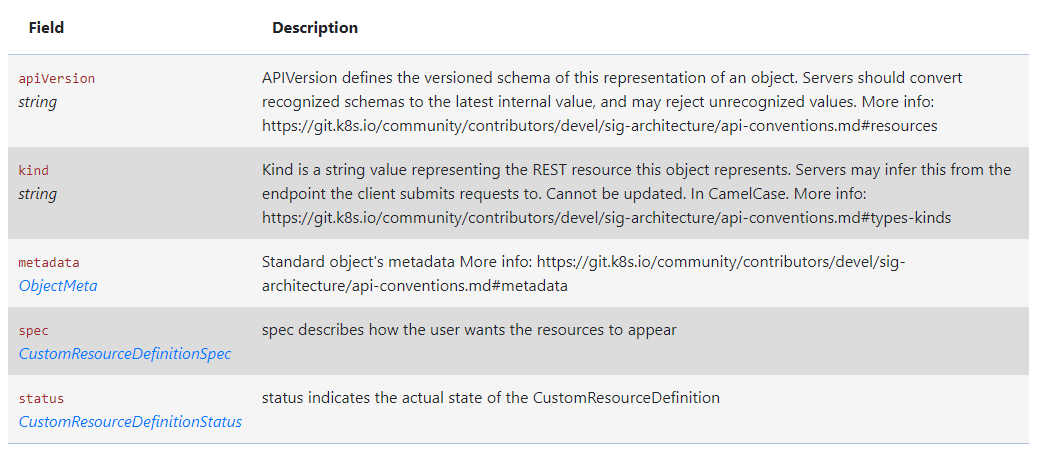
结构
创建 CustomResourceDefinition
当我们创建一个新的CustomResourceDefinition(CRD)时,k8s api服务会为我们指定的每一个版本生成一个
RESTful的资源路径。CRD中spec指定的scope字段,决定了CRD的作用域(namespace还是cluster)。
CustomResourceDefinition本身是不受作用域限制的,对所有集群和namespace都可见。
CRD示例
apiVersion: apiextensions.k8s.io/v1
kind: CustomResourceDefinition
metadata:
  # 名字必需与下面的 spec 字段匹配,并且格式为 '<名称的复数形式>.<组名>'
  name: crontabs.stable.example.com
spec:
  # 组名称,用于 REST API: /apis/<组>/<版本>
  group: stable.example.com
  # 列举此 CustomResourceDefinition 所支持的版本
  versions:
    - name: v1
      # 每个版本都可以通过 served 标志来独立启用或禁止
      served: true
      # 其中一个且只有一个版本必需被标记为存储版本
      storage: true
      schema:
        openAPIV3Schema:
          type: object
          properties:
            spec:
              type: object
              properties:
                cronSpec:
                  type: string
                image:
                  type: string
                replicas:
                  type: integer
  # 可以是 Namespaced 或 Cluster
  scope: Namespaced
  names:
    # 名称的复数形式,用于 URL:/apis/<组>/<版本>/<名称的复数形式>
    plural: crontabs
    # 名称的单数形式,作为命令行使用时和显示时的别名
    singular: crontab
    # kind 通常是单数形式的帕斯卡编码(PascalCased)形式。你的资源清单会使用这一形式。
    kind: CronTab
    # shortNames 允许你在命令行使用较短的字符串来匹配资源
    shortNames:
    - ct
受命名空间所约束的restful api端点会被创建在:
/apis/[group]]/v1/namespaces/*/[plural]/...
# 上面的例子就是:
/apis/stable.example.com/v1/namespaces/*/crontabs/...
对应的CR
apiVersion: "stable.example.com/v1"
kind: CronTab
metadata:
  name: my-new-cron-object
spec:
  cronSpec: "* * * * */5"
  image: my-awesome-cron-image
CustomResourceDefinitionSpec具体字段
- conversion, CustomResourceConversion,该字段包含描述如何转换CR的不同版本。
- group, string. api中的group字段。在第一层metadata中的name=spec中的:
. - names, CustomResourceDefinitionNames,为自定义资源指定资源和种类名称
- preserveUnknownFields, boolean,
- scope, string, 范围指示定义的自定义资源是群集还是命名空间范围。允许的值是
Cluster和Namespaced - versions, arrayCustomResourceDefinitionVersion, 版本是定义自定义资源的所有API版本的列表。版本名称用于计算API发现中列出的服务版本的顺序。
CustomResourceDefinitionStatus 具体字段
- acceptedNames,CustomResourceDefinitionNames, 接受名称是实际用于服务发现的名称。它们可能与规范中的名称不同。
- conditions, arrayCustomResourceDefinitionCondition, 该字段表示习惯的特定方面的状态
- storedVersions,string array, StorageVersions列出了持久的所有版本的CustomSures。跟踪这些版本允许ETCD中存储版本的迁移路径。该字段是可变的,因此迁移控制器可以完成迁移到另一个版本(确保在存储中留下旧对象),然后从此列表中删除其余版本。在此列表中存在时,可能不会从
spec.versions中删除版本。
参考资料
- 官方文档
- 使用 CustomResourceDefinition 扩展 Kubernetes API, 版本是定义自定义资源的所有API版本的列表。版本名称用于计算API 发现中列出的服务版本的顺序。